Send your alerts
Every strategy has its own webhook URL. Treat it like a password: anyone who has it can send alerts to your strategy.
Point an alert at your strategy#
- Copy the URL from the Designer's first card, or from the Connection panel of an existing strategy.
- In the TradingView alert, switch on Webhook URL under Notifications and paste it.
- With the Signal Connector, choose Any alert() function call and leave the message empty. Otherwise paste the message HookTrader writes (How alerts are read).
- Fire it once. Until the strategy is on, alerts are recorded and never traded.
If nothing arrives, check the alert's log in TradingView. Then compare its URL with the strategy's, character by character.
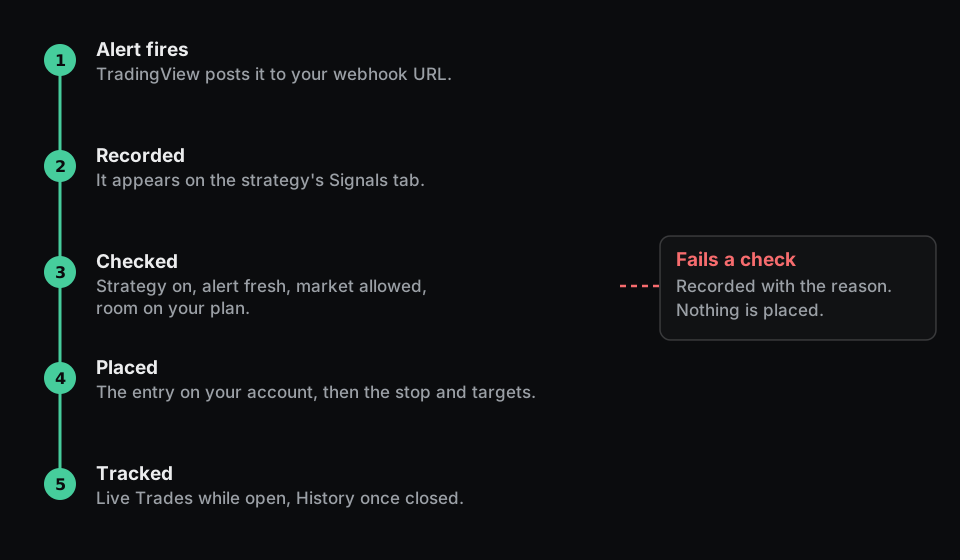
What happens to each alert#
An alert trades only when:
- The strategy is on.
- It arrived within 30 seconds of being sent. Ignore alerts older than changes this.
- The symbol matches the strategy's market, and no other strategy holds it on the same account.
- Your plan has room for another open position.
Otherwise it places nothing. Signals shows why. See Why an alert did not trade.
A duplicate alert trades once. An exit or target alert with no open trade does nothing.
Test without trading#
Choose Edit in Designer → More actions → Back to learning. Alerts are then recorded and never traded until you switch it on again.