What a target can do
Each target runs its steps in order when price reaches it.
The steps#
- take 50% off closes that share of what is still open, at market.
- add 50% to the position adds that share of what is open.
- start trailing the stop 1% behind price keeps your stop that far behind the best price from here, never back (Trailing stops).
Steps that take profit rest as orders on Binance from entry. Stop moves run when HookTrader sees price reach the target. See How your trade is protected.
Break-even, three ways#
Set Break-even means on a break-even step.
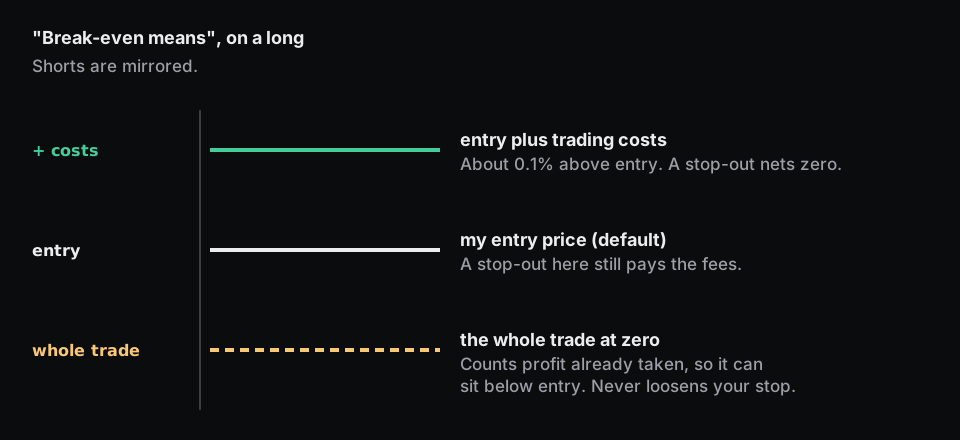
- my entry price (the default): a stop-out still pays both fees, about 0.1% of the position.
- entry plus trading costs: a stop-out nets zero after fees.
- the whole trade at zero: counts profit taken at earlier targets, so the stop can sit below your entry. Put it after the target's take % off step. It never loosens your stop.
If the break-even price is already through the price, HookTrader uses your entry price, or else keeps your stop. The target's other steps still run.
Fees assume Binance's standard 0.05%. Paying less leaves the stop slightly further out than needed.
Adding to a position#
After an add, your stop covers only the first entry until it next moves. Put a stop move after every add, on the same target:
At 1R, add 50% to the position, then move the stop to break-even.
After an add the entry price is not averaged, so cost-based break-evens are approximate.
Cancelling the resting orders#
Cancel orders leaves no stop on Binance until a later step or alert places one.
Alert values and custom events#
Alert values can also set the stop, target 2, or the size to add or take off.
Up to 10 named events each run their own steps when a custom alert with that name arrives. See the Reference.