Connect a Binance account
A live account trades your real funds on Binance. It needs the Solo or Pro plan and two-factor authentication. To practise first, create a paper account.
Use a dedicated sub-account#
HookTrader tracks and protects only the positions it opened. Create a Binance sub-account for it, and transfer in only the funds it should trade. Do not trade that sub-account by hand, or run another bot on it, while a strategy is on. A manual position confuses your P&L and your stops.
Create the API key#
On the sub-account, open API Management:
Create a System-generated key.
Turn on Enable Reading and Enable Futures. Leave everything else off, including withdrawals and transfers.
Choose Restrict access to trusted IPs only, and paste the IP HookTrader shows under Server IP for whitelist. A leaked key then works from nowhere else.
Copy the key and secret. Binance shows the secret once.
Connect it#
Turn on two-factor authentication under Settings → Security first. Then, on Exchanges, click Create account → Exchange account and paste the key and secret.
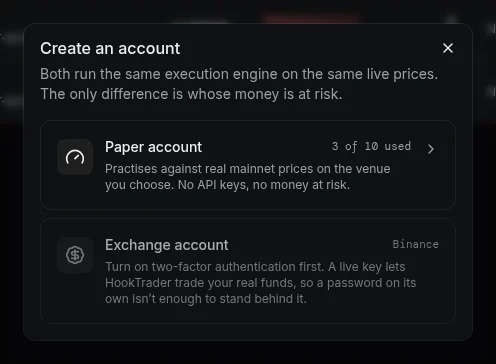
HookTrader checks the key with Binance first. If Binance refuses it, nothing is saved and the dialog shows why. The secret is stored encrypted and never shown again.
Margin defaults on the account page sets the leverage and margin mode applied before each entry.
If the key stops working#
After you change the key's permissions or IP list on Binance, click Verify permissions. If Binance refuses the key, the account shows Connection error. Alerts for its strategies are rejected until you fix it. See Binance errors.
One connection per account#
Binance gives each account one order stream, so connect each account once. Two sub-accounts are two connections, and each counts toward your plan's limit.