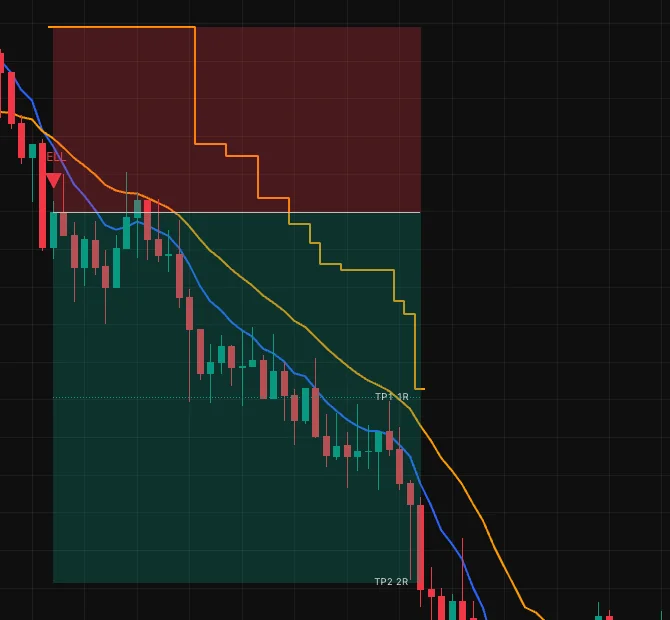
Set the stop and targets
A signal says when to enter. The plan says where the stop and targets sit and when the stop moves.
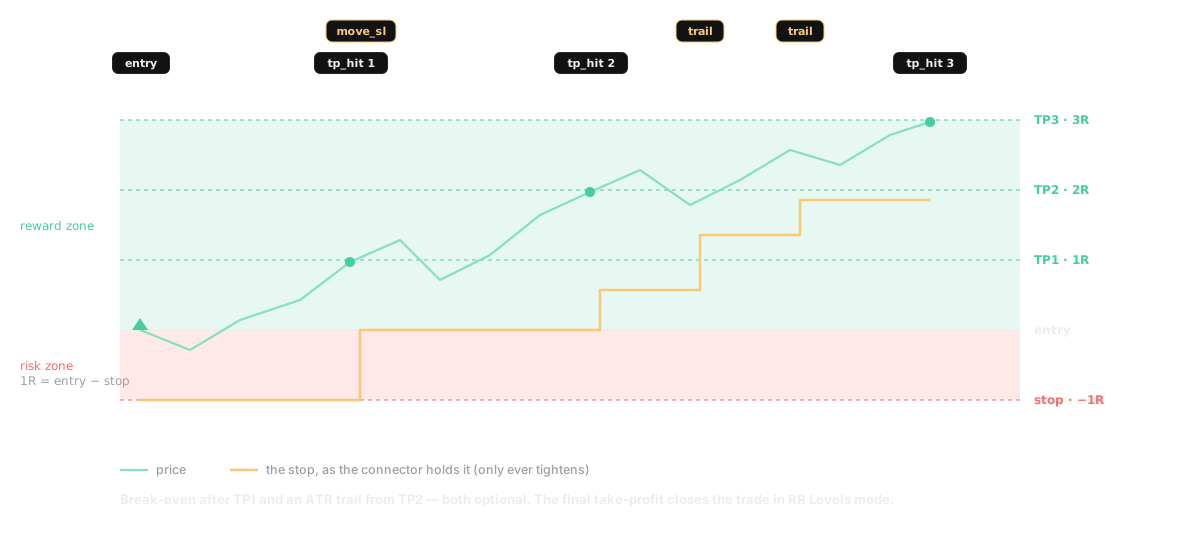
1R is the distance from the entry to the first stop. Targets, the backtest and HookTrader's position sizing all work in R, so 2R means the same on any symbol.
The stop#
| Stop Loss Mode | The stop sits at | Use it when |
|---|---|---|
| ATR (default) | ATR Mult × ATR from the entry | The stop should widen with volatility |
| Recent Swings | The extreme over Swing Lookback bars, plus Swing Offset | Your stop goes under structure |
| External Plot | Another indicator's plot, such as SuperTrend | Another indicator draws your stop |
An external stop plot must return a price. If it prints na on the signal bar, set Entry Timing to Next Bar Open.
Move SL to Break-Even After TP # moves the stop to the entry the bar after that target prints. HookTrader moves your exchange stop to match.
The targets#
Set Number of TP Levels (1 to 10) and each level's RR. In RR Levels mode the last target closes the trade. In Indicator Exit mode an exit plot does, and the inner targets still fire.
Each target sends one alert. What happens there is set on the strategy in HookTrader: take some off, move the stop, or start the trail. See What a target can do.
HookTrader places targets from its real fill, so they differ from the chart by your entry slippage.
The trailing stop#
Set Trailing Stop Mode to ATR Trailing, Percentage Trailing or External Plot. A larger TS ATR Mult trails looser. Activate Trailing After starts it at entry or after a target, which lets the trade move first.
A trail only tightens. Each move sends an alert on a confirmed bar, and HookTrader moves your stop to match.