Wire your signals
The connector reads a plot as numbers. Signal Source Mode says what shape they take, so it fires on the bars your indicator means.
Wire the sources#
Under Signals, set Long Signal Source and Short Signal Source to your indicator's plots. Wire one side only for a long-only or short-only setup. Turn on Display → Highlight Signal Bars to check: long bars shade green, short bars red.
Only Trigger at Bar Close is on by default. It ignores a marker that appears and vanishes mid-bar.
Pick the reading mode#
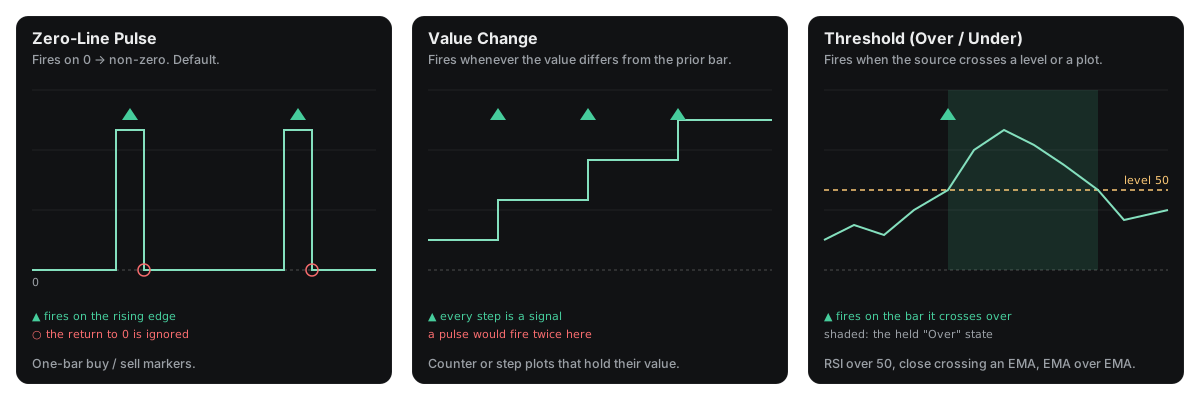
| Mode | Fires when | Suits |
|---|---|---|
| Zero-Line Pulse (default) | The plot rises from 0 or na | One-bar buy and sell markers |
| Value Change | The value differs from the bar before | Counters and step plots |
| Threshold (Over/Under) | The plot crosses a level or another plot | RSI over 50, a close crossing an EMA |
In the first two modes, a source left on close counts as unwired, and that side stays silent. In Threshold mode, close is the close price.
Set a threshold#
Under Threshold Condition, each side has a Condition and a Level or Plot to compare against. The conditions are Over, Under, Crossover and Crossunder. Off, the default, keeps that side silent. An entry fires once, on the bar the source crosses onto the wanted side.
- RSI over 50: source = RSI, Over, Level 50.
- Close crosses an EMA: source =
close, Crossover, Plot = the EMA.
Find the right plot#
When an indicator has several look-alike plots, use Plot Inspector. Turn on Highlight Inspect Sources, point the inspect slots at the candidates, and hover a bar. A marker plot reads 0 on most bars and a value on signal bars. Wire the one you find, then turn the inspector off.